> ## Documentation Index
> Fetch the complete documentation index at: https://rapidreview.io/docs/llms.txt
> Use this file to discover all available pages before exploring further.
# Chat in the web app
> The research agent behind ⌘K: sessions, mentions, slash commands, research mode, sub-agents, artifacts, sharing, and your local files.
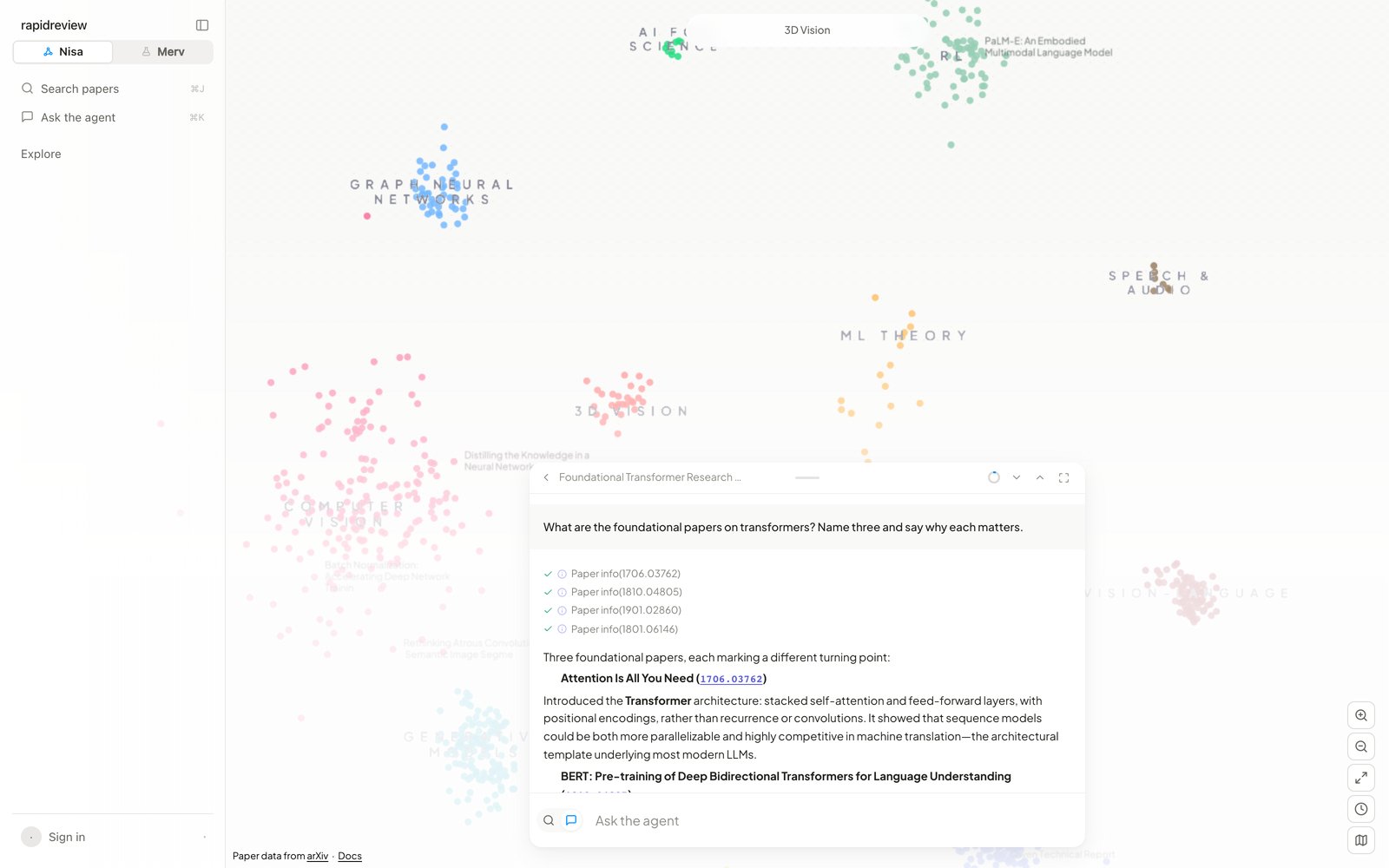 Press `⌘K`, click **Ask the agent** in the rail, or flip the bar's icon to chat. Ten messages are free without an account; signed in, there is no cap. Sessions persist and are the same sessions the CLI lists with `nisa sessions` — start in one place, continue in the other. [Terminal chat](/docs/nisa/guides/terminal-chat)
## What the agent can do
Search the corpus (text, semantic, by author, similar papers), read papers page by page, follow citation graphs, open a paper's GitHub repository, search the web, run code in a CPU sandbox (numpy, pandas, scipy, matplotlib, scikit-learn preinstalled), draw charts and images, write PDFs, and manage your lists. Papers it cites are pushed onto the map and highlighted; in fullscreen (`Esc` leaves) a **research rail** shows the conversation's papers with filters and CSV export.
## Writing
`Enter` sends, `Shift+Enter` breaks a line. Send while it's working and the message queues (× removes it). **Stop** freezes the answer; an error banner offers **Retry**. `@` mentions a paper or one of your lists by name — the agent receives the id. `/` opens the commands:
| Command | Does |
| ----------- | ------------------------------ |
| `/new` | Start a new chat |
| `/sessions` | Browse past chats |
| `/clear` | Clear the draft |
| `/connect` | Connect your local CLI (below) |
| `/share` | Share this chat by email |
The small ring by the header is the context meter — hover for `used / window`; the agent compacts context itself when it fills, shown as **Compacting context**.
## Research mode and sub-agents
For a broad question the agent may enter **Research Mode**: a card with the brief, a question list that fills in as **Explorer** runs answer each one, then a **Research Report** card with a download (a typeset PDF). Delegated work shows as cards — **Explorer**, **Scout**, **Sandbox**, **Report Generator** — click one to read what it did and download its report. Spend per research run is bounded.
## Artifacts
Generated PDFs arrive as **PDF ready** cards with a download button. Generated images have a download button and open fullscreen on click.
## Sharing a chat
`/share` invites someone by email — they need a RapidReview account; there is no public link. Everyone in the chat can contribute; messages carry the author's avatar and the agent is told who said what. Your local-folder connection stays yours alone. Shared chats show a people icon in the rail. Deleting a chat gives you five seconds to undo.
## Your local files
`/connect` shows a one-time `brg_…` token (five minutes). In a terminal, `cd` into the folder, run `nisa`, paste `/connect `. The agent can now read that folder — writes and commands only if you allow them, and only from the CLI (`/permissions`). [Local folder access](/docs/nisa/guides/connect-a-folder)
Nisa is in preview — the **Feedback** item in the account menu goes straight to the team.
Press `⌘K`, click **Ask the agent** in the rail, or flip the bar's icon to chat. Ten messages are free without an account; signed in, there is no cap. Sessions persist and are the same sessions the CLI lists with `nisa sessions` — start in one place, continue in the other. [Terminal chat](/docs/nisa/guides/terminal-chat)
## What the agent can do
Search the corpus (text, semantic, by author, similar papers), read papers page by page, follow citation graphs, open a paper's GitHub repository, search the web, run code in a CPU sandbox (numpy, pandas, scipy, matplotlib, scikit-learn preinstalled), draw charts and images, write PDFs, and manage your lists. Papers it cites are pushed onto the map and highlighted; in fullscreen (`Esc` leaves) a **research rail** shows the conversation's papers with filters and CSV export.
## Writing
`Enter` sends, `Shift+Enter` breaks a line. Send while it's working and the message queues (× removes it). **Stop** freezes the answer; an error banner offers **Retry**. `@` mentions a paper or one of your lists by name — the agent receives the id. `/` opens the commands:
| Command | Does |
| ----------- | ------------------------------ |
| `/new` | Start a new chat |
| `/sessions` | Browse past chats |
| `/clear` | Clear the draft |
| `/connect` | Connect your local CLI (below) |
| `/share` | Share this chat by email |
The small ring by the header is the context meter — hover for `used / window`; the agent compacts context itself when it fills, shown as **Compacting context**.
## Research mode and sub-agents
For a broad question the agent may enter **Research Mode**: a card with the brief, a question list that fills in as **Explorer** runs answer each one, then a **Research Report** card with a download (a typeset PDF). Delegated work shows as cards — **Explorer**, **Scout**, **Sandbox**, **Report Generator** — click one to read what it did and download its report. Spend per research run is bounded.
## Artifacts
Generated PDFs arrive as **PDF ready** cards with a download button. Generated images have a download button and open fullscreen on click.
## Sharing a chat
`/share` invites someone by email — they need a RapidReview account; there is no public link. Everyone in the chat can contribute; messages carry the author's avatar and the agent is told who said what. Your local-folder connection stays yours alone. Shared chats show a people icon in the rail. Deleting a chat gives you five seconds to undo.
## Your local files
`/connect` shows a one-time `brg_…` token (five minutes). In a terminal, `cd` into the folder, run `nisa`, paste `/connect `. The agent can now read that folder — writes and commands only if you allow them, and only from the CLI (`/permissions`). [Local folder access](/docs/nisa/guides/connect-a-folder)
Nisa is in preview — the **Feedback** item in the account menu goes straight to the team.